Bagel
A platform for deploying infrastructure from Terraform: connect GitHub, choose a cloud, add credentials, pick a repository, then track every deployment.
- Role
- Product and UX design
- Platform
- Web app (desktop)
- Status
- Product
- Users
- Engineers who deploy infrastructure, and the people who review changes
Overview
Guiding an engineering team from an empty repository to a live Terraform deployment.
Bagel is a product for deploying and managing cloud infrastructure from Terraform code. It replaces fragmented terminal commands and opaque cloud consoles with a guided setup workflow, real-time diff previews, and operational status dashboards.
The problem
Getting from an empty account to a first Terraform deployment means handing over a GitHub token and cloud credentials, and the steps for creating them live in other products' settings pages. The product has to make that setup clear and low-risk, then keep every deployment easy to scan.
Infrastructure as code holds enormous power, but catastrophic failure is only one bad config commit away. Engineers often hesitate during initial setup because configuring access keys and IAM roles without guidance feels risky, and reviewing changes in terminal output makes accidental resource deletion easy to miss.
How might we
- How might we guide credential setup without sending people to other tabs?
- How might we show what a deployment will change before anyone approves it?
- How might we make the state of every project visible at a glance?
Goals and how success is judged
- Primary goal: A new user reaches a connected project with a repository and branch selected in under five minutes.
- Secondary goal: Deployments and change sets are readable at a glance, with the exact impact and outcome obvious.
Key success measures: high completion rate through the five-step setup flow, zero unhandled credential permission errors, and rapid review turnaround on deployment requests.
Who it's for
Designed for engineering teams: practitioners setting up environments and deploying code, and team leads reviewing infrastructure diffs before execution.
Proto-personas. Based on assumptions about the audience, not on interviews. Replace with research if you have it.
The engineer setting up
Technical practitioner configuring infrastructure and automated CI/CD triggers.
The reviewer
Senior engineer or team lead reviewing infrastructure plans prior to apply.
Research and landscape
Reviewing modern developer platforms for cloud infrastructure highlighted two distinct failure modes in existing tooling:
- CLI-only tools lack visual auditability. Terminal logs require engineers to scroll through hundreds of lines of plan output to spot destructive changes. Bagel parses plan files into structured visual badges showing exact resources added, altered, or destroyed.
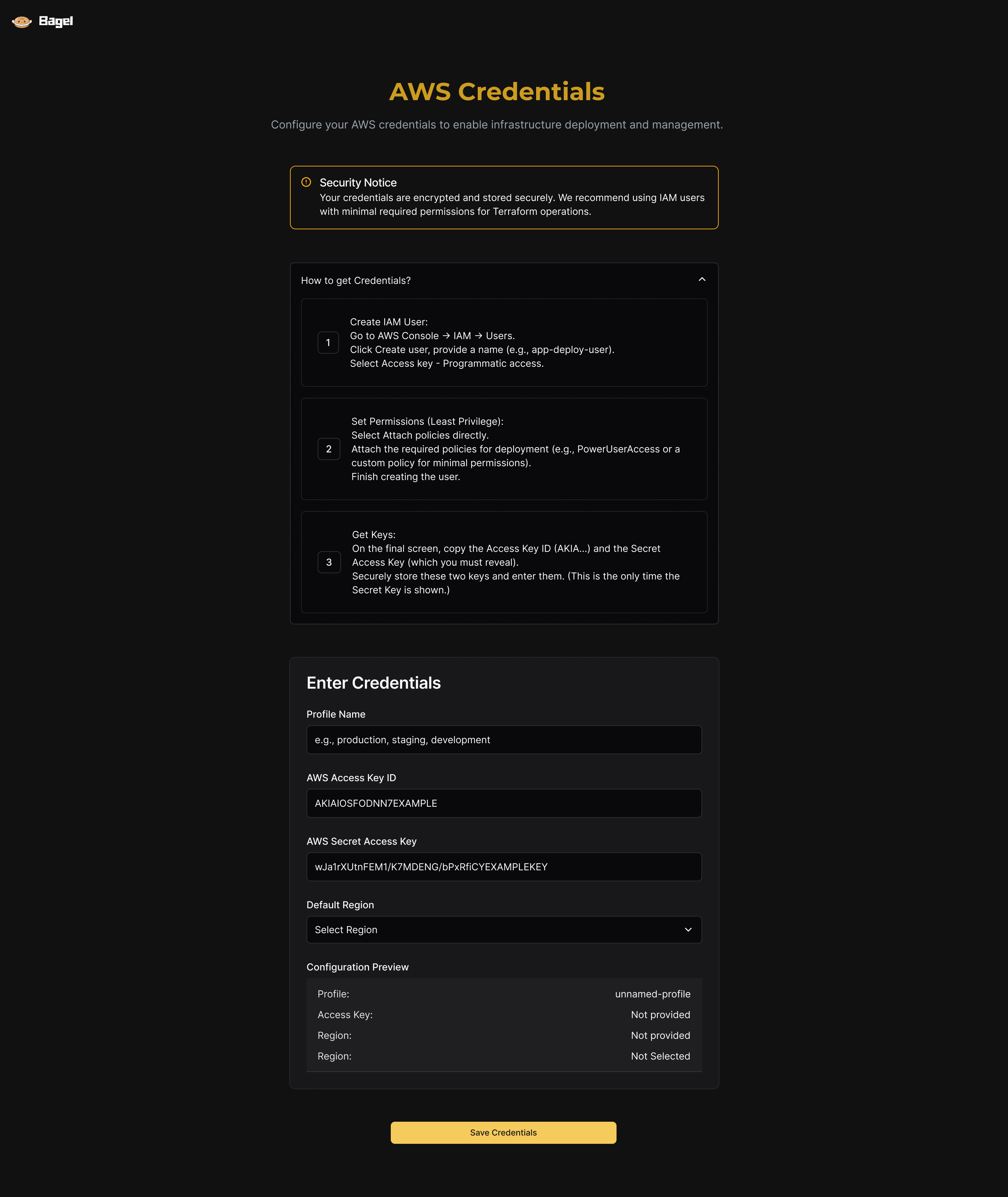
- Cloud provider consoles are impenetrable mazes. Generating an IAM role with appropriate trust relationships often takes dozens of clicks across obscure AWS IAM submenus. Bagel brings the least-privilege policy into an inline copyable block inside the flow.
- Context switching during onboarding. When setup requires jumping between documentation, GitHub settings, and AWS security consoles, drop-off spikes. Embedding collapsible instructions directly next to input fields keeps operators focused.
Structure and flow
Principles
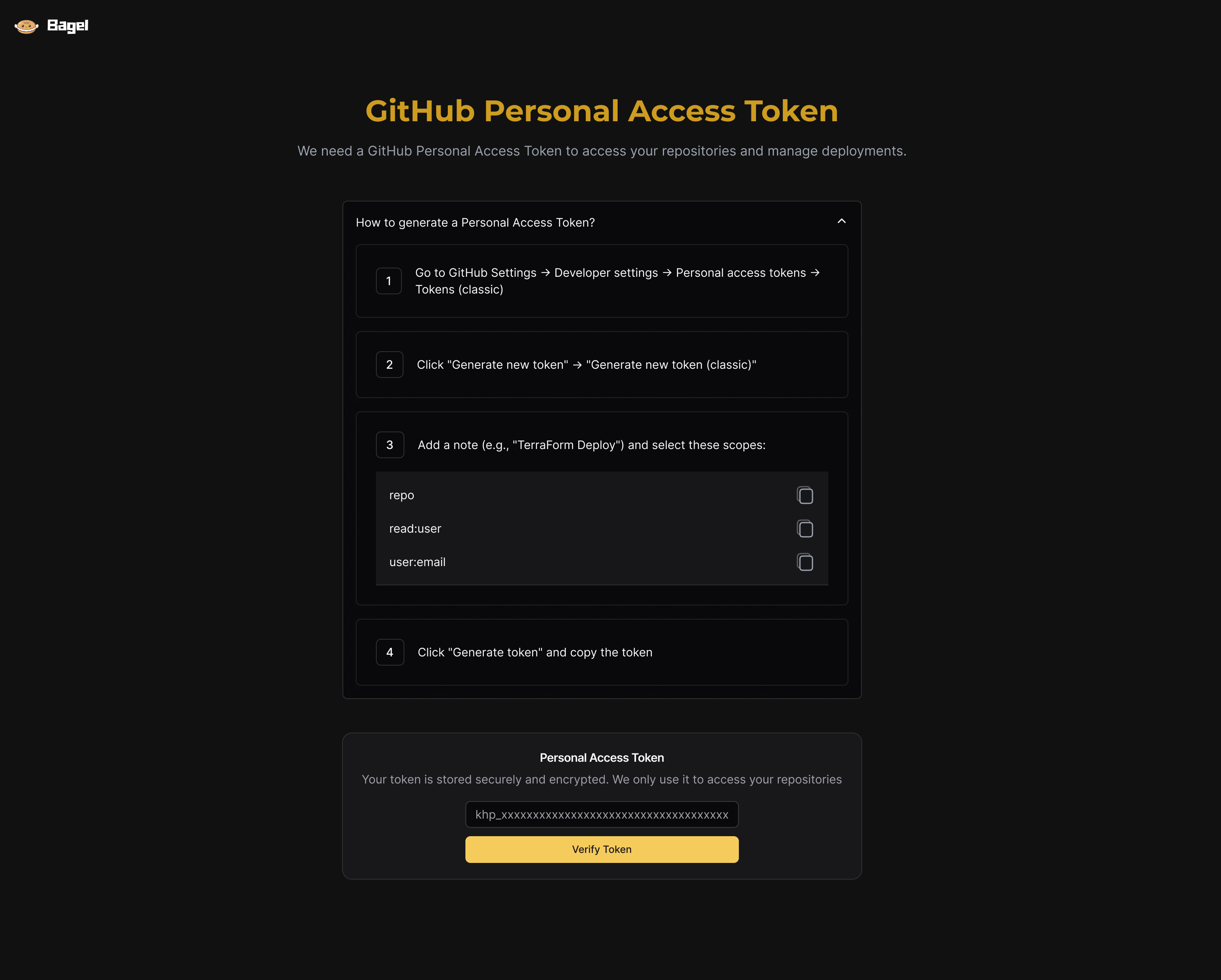
- Explain the hard step where it happens. Credential steps carry a collapsible guide with numbered steps and copy buttons, avoiding context switching.
- Show the state of everything. Every resource, credential and run displays an unambiguous status dot and a readable label.
- Show what a change will do before it runs. Explicit counts for resources added, altered or destroyed give reviewers clarity prior to execution.
Setting up a project
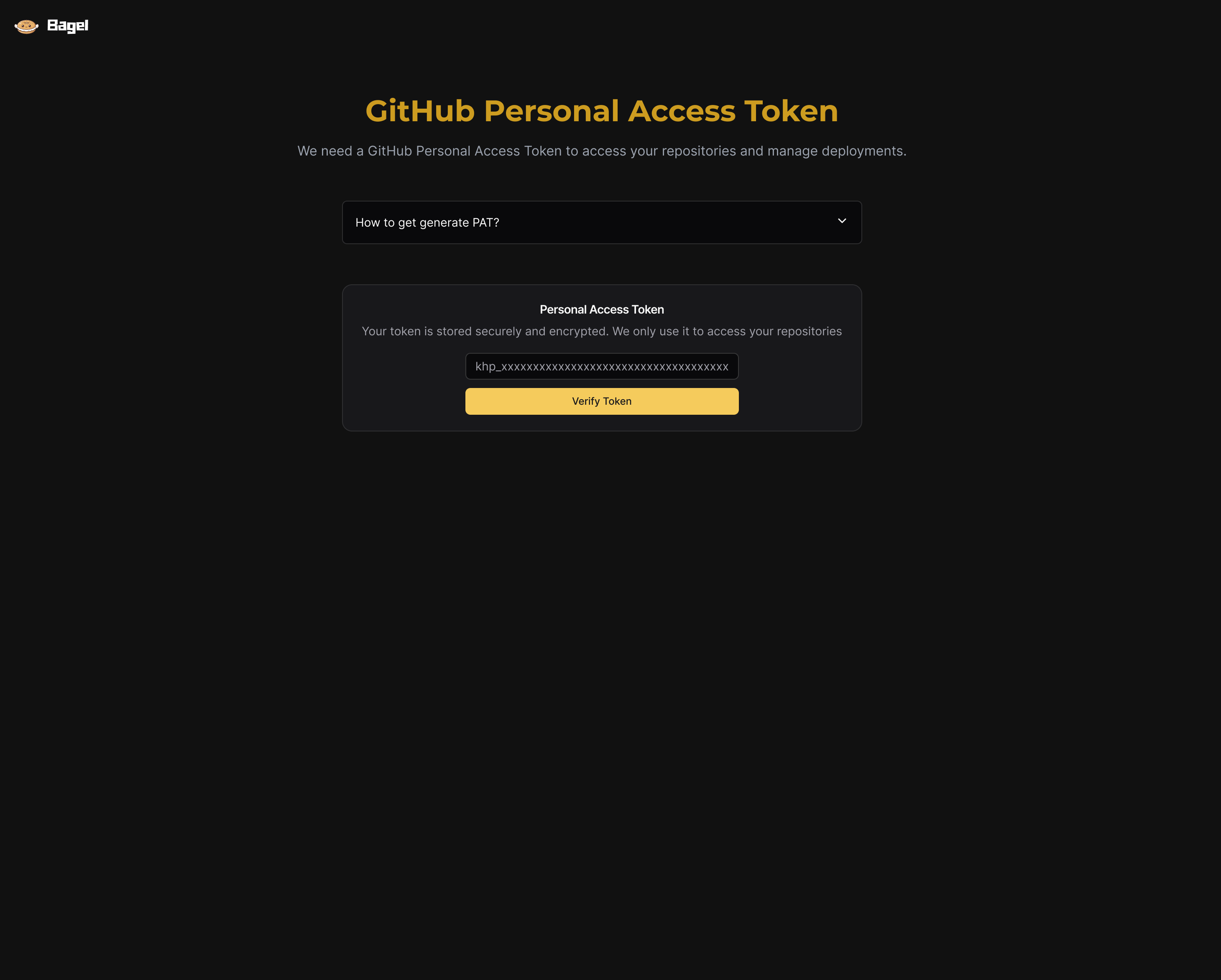
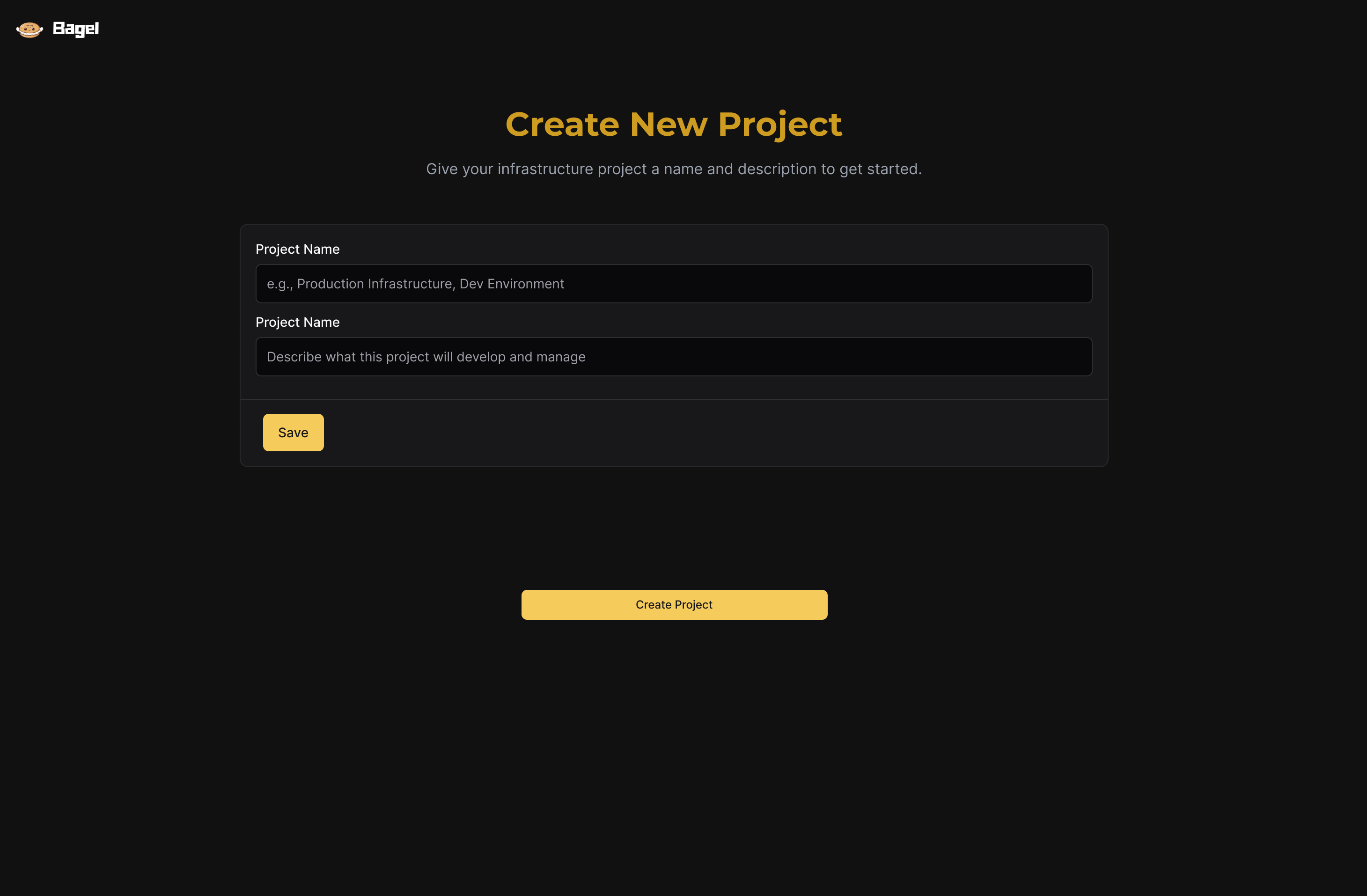
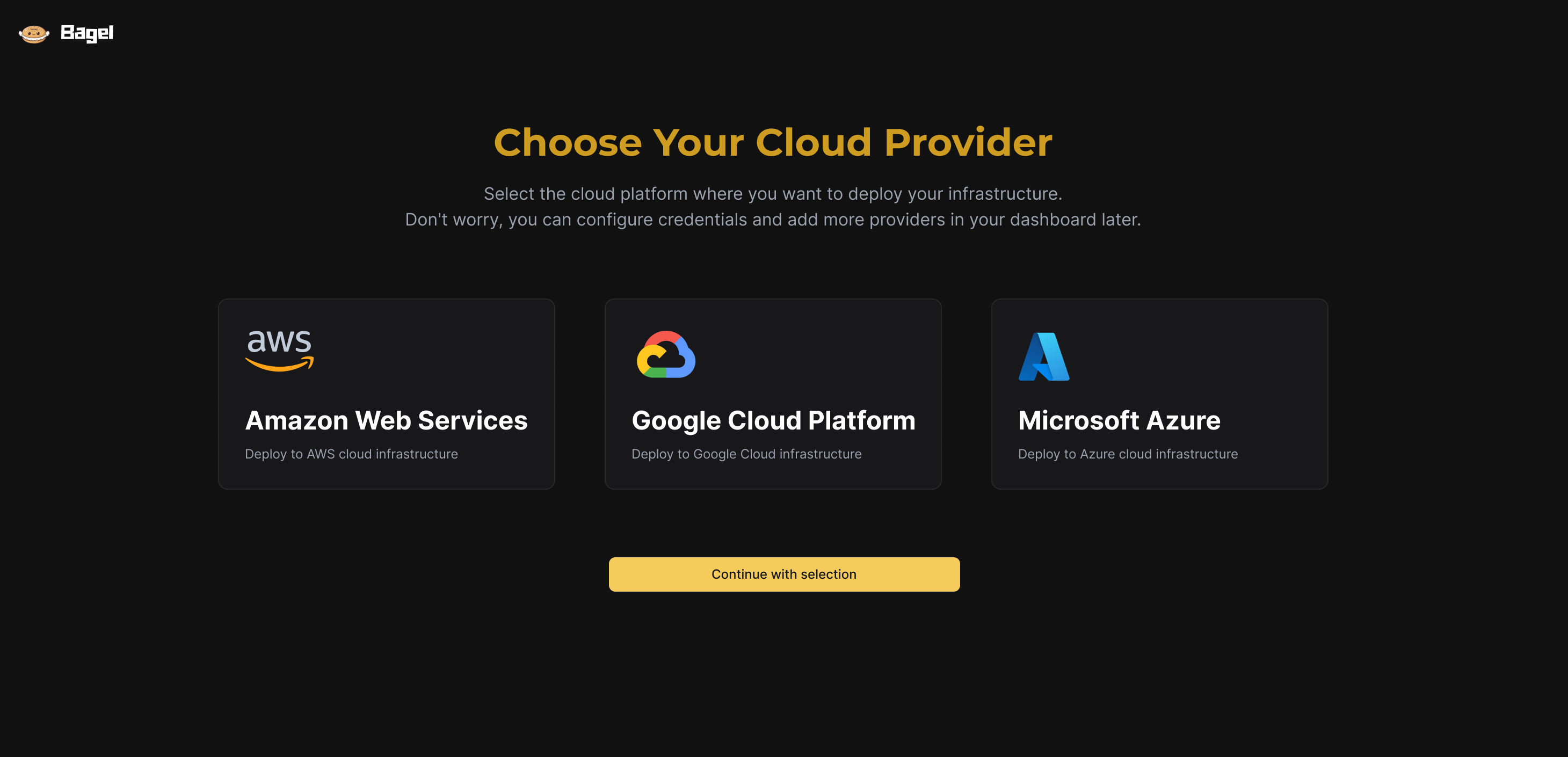
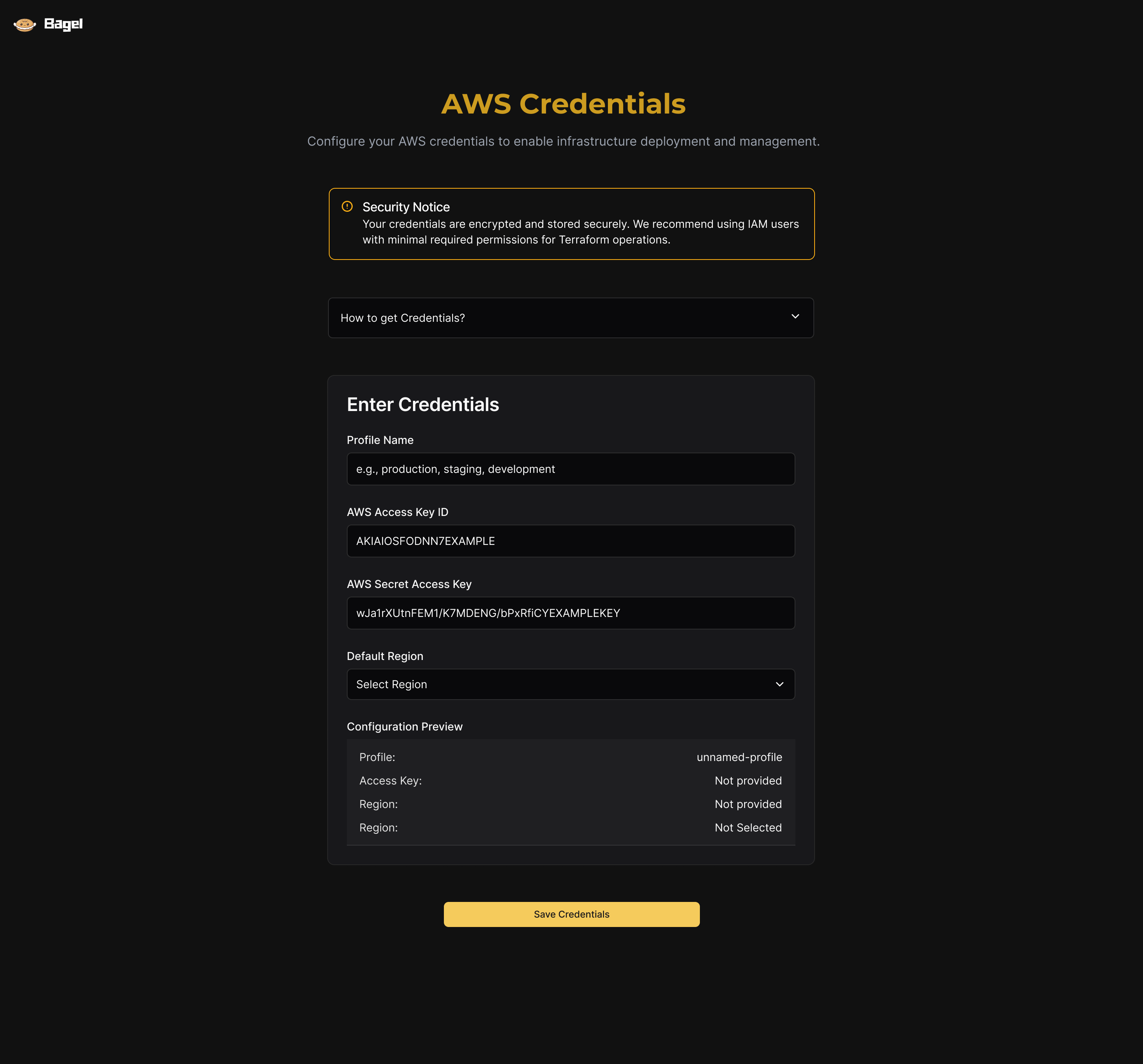
The onboarding journey guides the operator across five focused steps:
- TokenGitHub PAT
- ProjectName & org
- ProviderCloud target
- CredentialsAccess keys
- RepositoryBranch & files
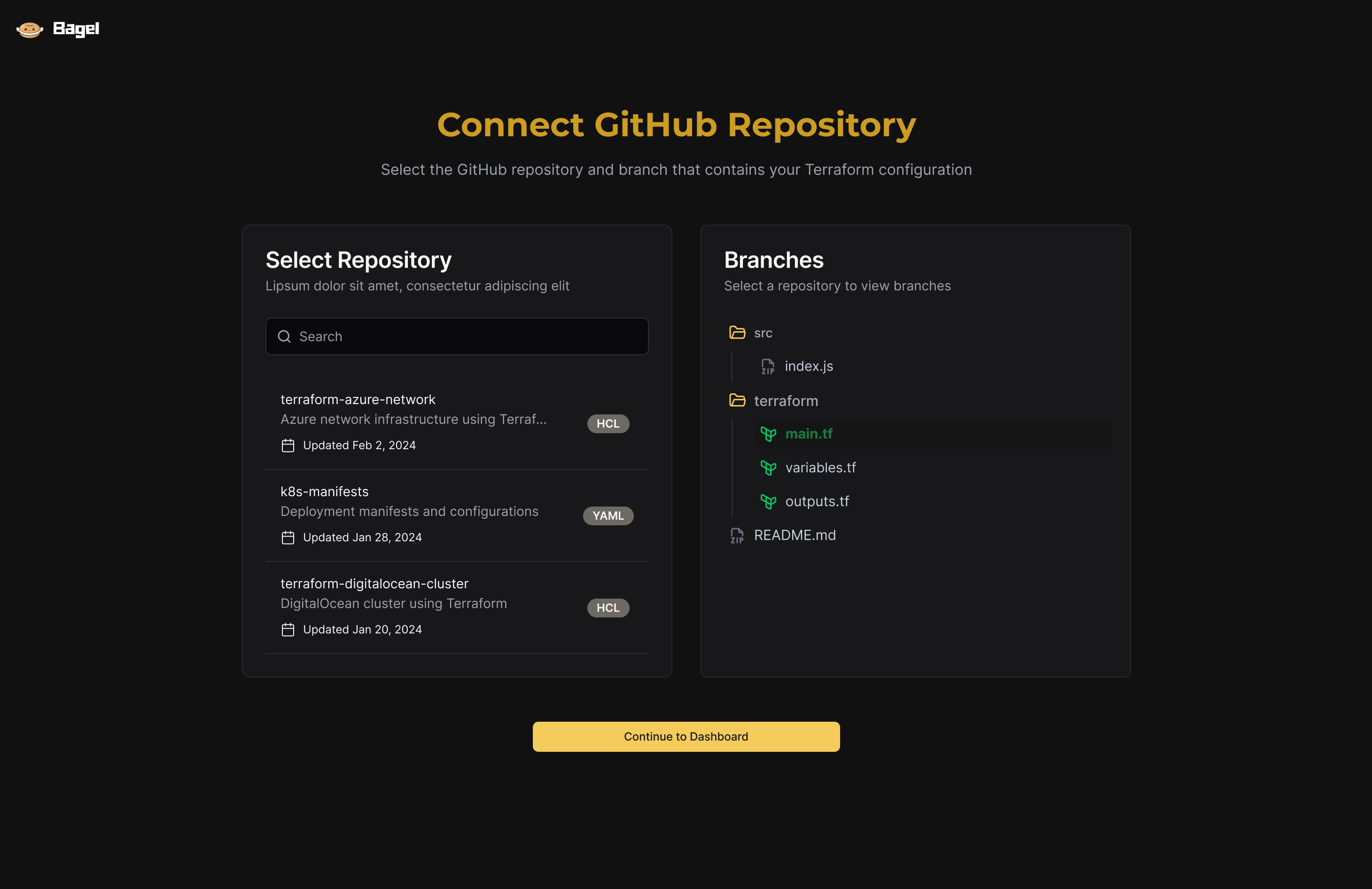
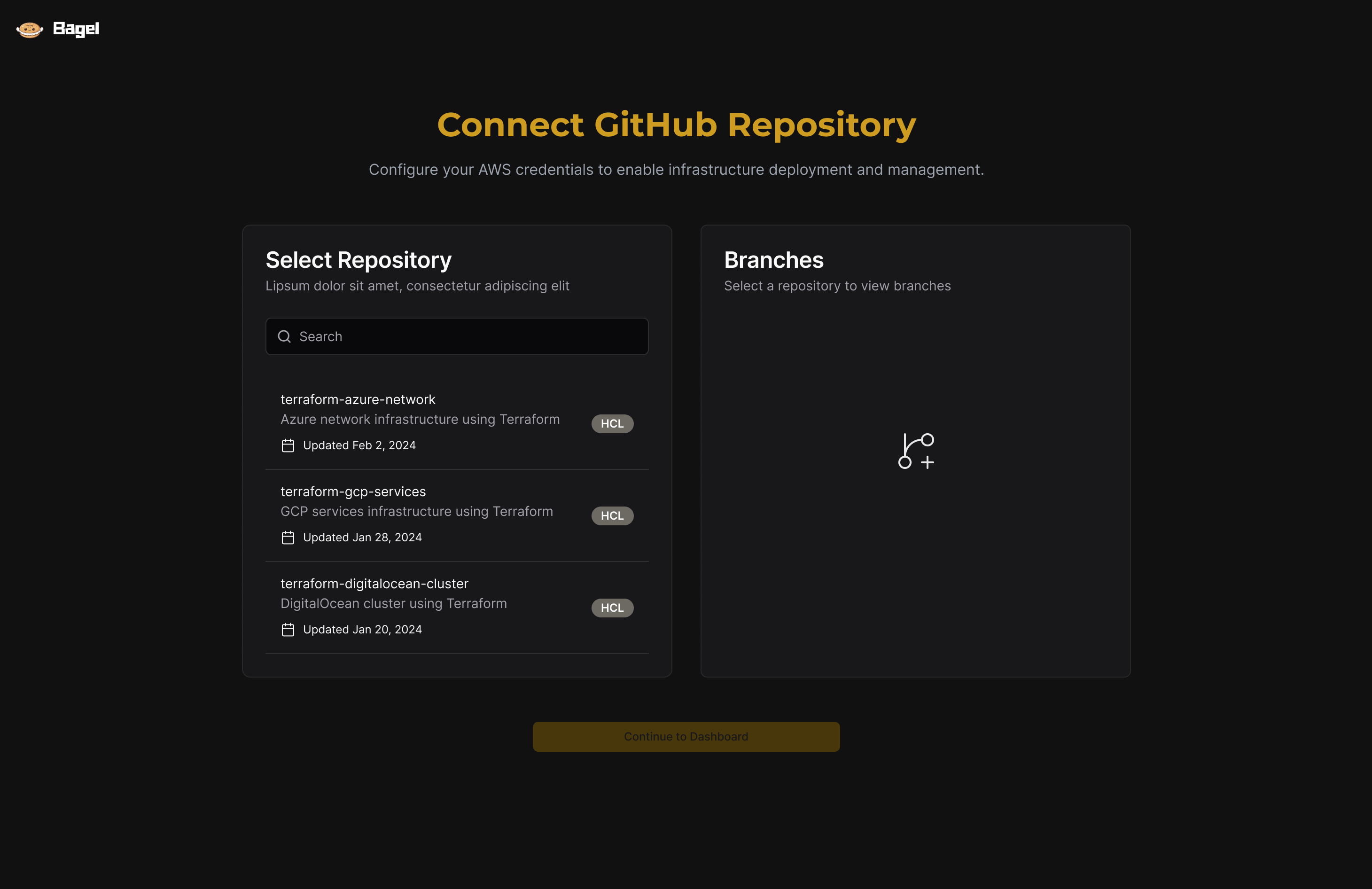
The token step lists the exact scopes to select with instant copy triggers. The repository step uses a split-pane layout showing branches and a live file tree with main.tf, variables.tf and outputs.tf.
Decisions
Inline help for credentials
Instead of sending operators to external cloud documentation, credential screens embed an inline collapsible guide detailing token generation and IAM least-privilege policies. This keeps security requirements visible without cluttering the primary form fields.
Configuration preview on credentials screen
The credentials form displays an immediate preview card showing resolved access and target environment parameters before submission, validating connectivity before any deployment attempt.
Repository and branch picker with file tree
Operators select repositories and explore Terraform files directly within the flow. The right pane confirms configuration structure before deployment triggers.
Projects dashboard
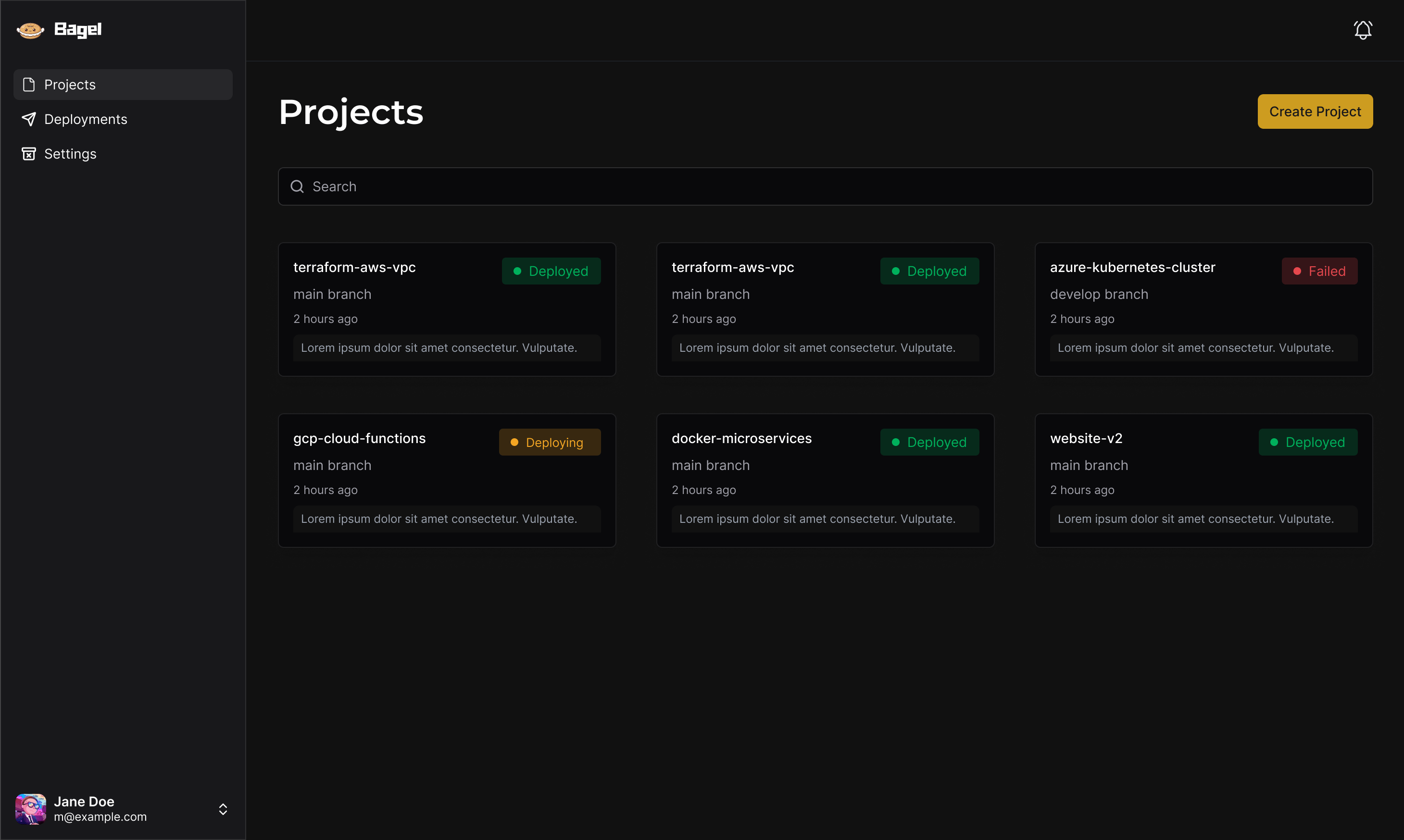
Dashboard cards summarize project identity, active branch, last run timestamp and clear status tags (Deployed, Failed, Deploying), giving team leads an immediate pulse check across their entire cloud footprint.
Deployments list and audit trail
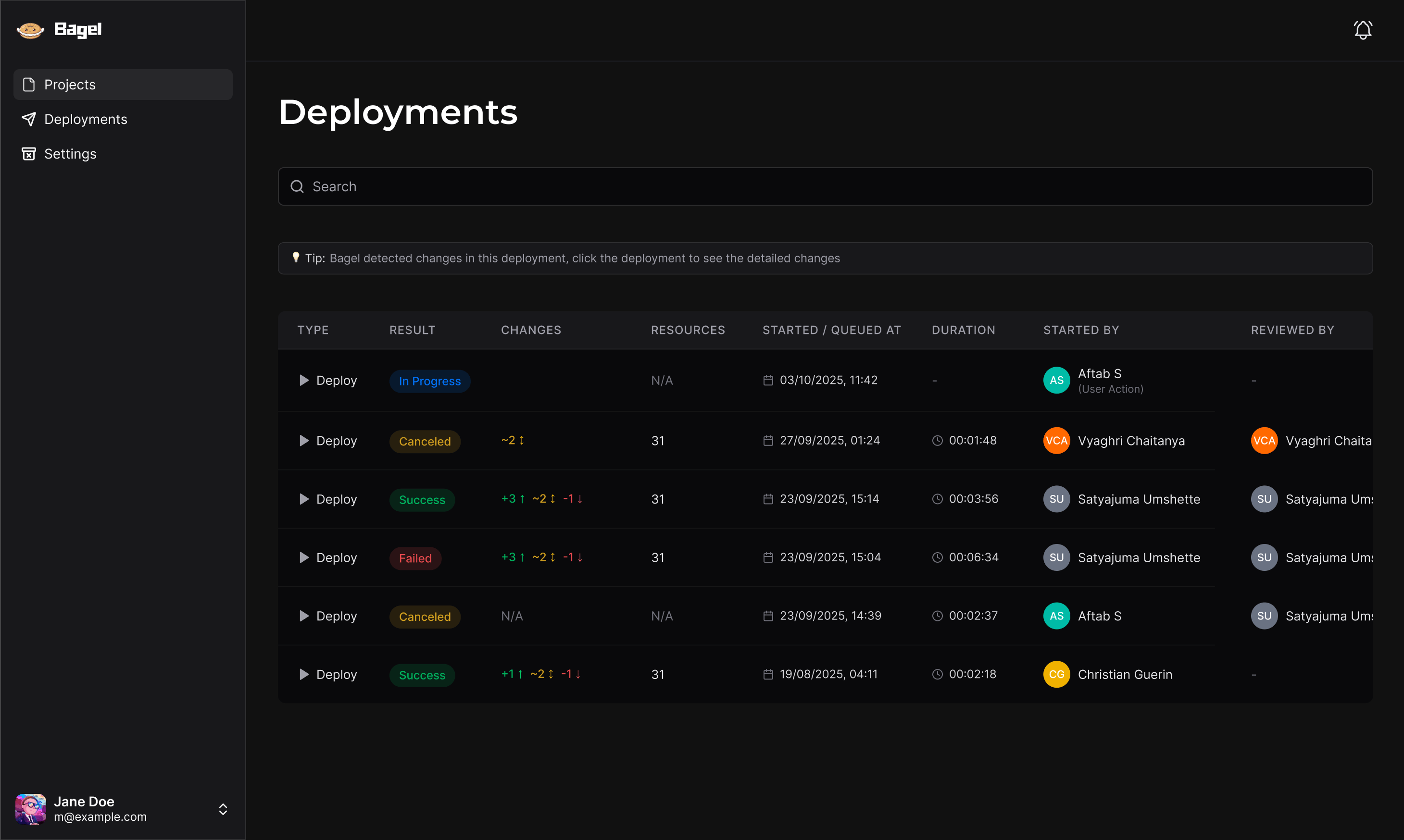
A tabular overview surfaces run Type, Result, Changes (+/~/-), Resources, Started / Queued timestamp, Duration, Initiator, and Reviewer. Status pills clearly signal In Progress, Canceled, Success, or Failed, ensuring complete governance.
Design system
Bagel runs on a specialized technical dark-mode design system tailored for operational clarity:
Surfaces & Lines
Golds & Buttons
Status Badges
The system purposefully utilizes two complementary golds: deep gold (#CD9C20) establishes calm authority for top-level page headers and dashboard primary actions, while high-chroma bright gold (#F5CB5C) guides focus to forward-moving setup triggers during initial onboarding.
Results
- A fully articulated product workflow turning raw Terraform runs into scannable visual interfaces.
- Guided 5-step onboarding flow connecting GitHub, cloud providers, credentials and repositories with zero tab-switching.
- Operational dashboards and tabular audit views designed for complex infrastructure scanning and fast code reviews.
- Token-driven dark mode with accessible status pills, clear diff counts, and unambiguous state changes.
Building Bagel reinforced that developer tooling doesn't have to be visually Spartan to be powerful. By structuring credential steps and rendering deployment changes as clear diff cards, we reduced review fatigue and made cloud deployments predictable.